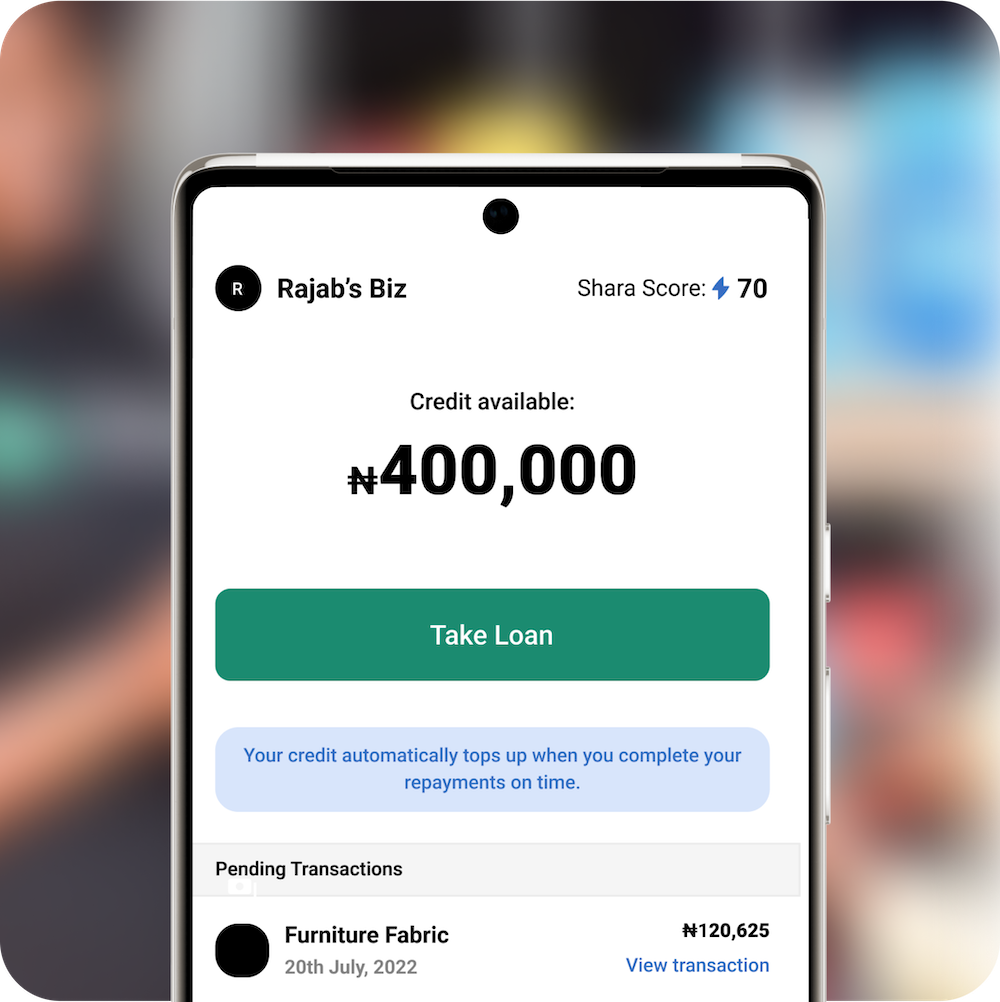
Get up to
₦10M
in SME loans- No collateral needed
- Competitive rates
- Flexible repayment options

Quick and easy application process
Requirements:
 6 Months Bank statements showing Business Transaction History
- Bank Verification Number (BVN)
- Government-Issued Identity Card
- CAC Registration Document (If Registered)
- Proof of Physical Place of Business (KYC will be Done)
Download the app to get started today!
Read more about Shara’s mission
Grow your business with Shara

Over ₦45BN Disbursed
We provide merchants quick access to funds to finance their business with No Hidden Charges or Guarantors involved.

600k Loans Taken
We offer our Merchants consistent access to recurrent loans and will continue to do so as long as they repay on-time.

8,000 Shara Merchants
We are committed to the providing our Credit Communities with personalized business support services all year round.
What Shara customers say
Shara loans have transformed thousands of businesses across Africa
Ayodele John, Electronics
Lagos
"Unlike conventional commercial and micro-finance banks, Shara gave me a better loan with little to no paperwork and collateral making the entire process from application to receiving the loan seamless."
Ayodele John, Electronics
Lagos
"Unlike conventional commercial and micro-finance banks, Shara gave me a better loan with little to no paperwork and collateral making the entire process from application to receiving the loan seamless."
Ayodele John, Electronics
Lagos
"Unlike conventional commercial and micro-finance banks, Shara gave me a better loan with little to no paperwork and collateral making the entire process from application to receiving the loan seamless."
Ayodele John, Electronics
Lagos
"Unlike conventional commercial and micro-finance banks, Shara gave me a better loan with little to no paperwork and collateral making the entire process from application to receiving the loan seamless."
Ayodele John, Electronics
Lagos
"Unlike conventional commercial and micro-finance banks, Shara gave me a better loan with little to no paperwork and collateral making the entire process from application to receiving the loan seamless."
Shara in the news








Frequently asked questions
Can’t find the answers you are looking for? Contact Us
A Shara wallet is a digital purse that allows you (a Shara merchant) to transact - Deposit, Withdraw, and make Repayment. There you see your wallet balance, which can be toggled to be visible or invisible.
A transaction PIN is a set of 4 numbers a merchant uses to carry out a transaction on the app. It is very important to keep your transaction PIN confidential and not share it with anyone. A transaction pin aims to secure your Shara account and to ensure a safe transaction.
Also, you should choose a PIN that is unique and not easily guessable, and avoid using obvious combinations like your birthdate or sequential numbers. Additionally, it's a good practice to regularly monitor your account on the app for any suspicious activity and report any unauthorized transaction immediately to the Customer Support team.
To access Shara financing, a Community Lead (a Sales/Growth officer) from Shara will contact you to assess your business and its revenue. This will require some of your valid documents (including your 6-month bank statement, and government-issued ID) and after assessment, if satisfactory, you will be approved and able to finance your transactions with Shara. Please message Customer Support providing your business location and phone number so we can contact you.
You will get an SMS from Shara confirming your approval status. Your Community Lead will also call you to give you feedback.
If your application is rejected it could be due to having a bad credit score, having unpaid or running loans with other loan companies, not having a physical place of business, or low business revenue. This will be communicated to you after we have assessed your business.
For further information please contact your Community Lead or the Customer Support team.
- Click on the Transactions menu
- Select the loan you want to repay
- Click on Repay Loan
- Select/Input the Amount you want to repay
- Input your Transaction PIN
After inputting your transaction PIN you should get a prompt confirming that your repayment has been completed successfully.
- Open the Shara app on your device.
- Select the "Balance" menu.
- On the "Balance" menu, select the option labeled "Deposit"
- You will find a list of account numbers displayed. These numbers are associated with your wallet and will update your balance when funds are transferred into them.
- To fund your Shara wallet, use any of the account numbers shown in the app. Simply transfer money to the selected account number(s) to add funds to your wallet.
- Select the Balance menu at the bottom of your app screen
- Select Withdraw
- Enter the Amount you want to withdraw and select the Bank Account you are withdrawing to select Next then
- Input your 4-digit Transaction PIN
After completing these steps you have successfully withdrawn to your Commercial Bank.
- On your Homepage tap Take Loan
- Type in the Loan Amount you want to take
- Type in the name or description of the goods you are buying
- Select the Loan Tenor
- Click Next
- View the full breakdown of the loan you are about to take then click Next as confirmation
- Select I Agree and input your Transaction PIN
- Loan application successful. The money is now in your Shara wallet.
When you become a Shara Merchant you are assigned a Repayment Score of 50. The maximum possible Repayment Score is 100 and the Minimum Repayment Score is 0. This is then a numerical representation of your creditworthiness with Shara.
Score Increases
The Share Score increases when Repayments have been made. The amount your score increases depends on 3 factors:
- The percentage of the Limit that has been repaid
- The Days Past Due of Repayments
- The average amount of days past due of customer repayments over the last two months)
Score Decreases
The Shara Score decreases when there are current outstanding payments that are past due
The Shara Score decreases depending on two things
- The percentage of the Limit that is currently overdue
- The number of Days Past Due for the current Overdue Payments.
In any situation while on the Shara app, whether you're seeking answers, require guidance, or have a concern to address, rest assured, that we are readily available to assist you. With our mobile app, connecting with our committed Support team has never been more straightforward.
Follow these steps to reach out to us whenever you find the need:
- Open the Settings menu
- Select the Help, Support, and Complaints option
- Send us a message
A Support representative will be sure to respond to your inquiries, requests, or complaints within a few minutes.
Follow these steps to set your transaction PIN on the Shara app
- Log in to the app
- Click on Settings
- Click on Payment Settings
- Click on Create Pin
- Input the four (4) numbers you choose as your PIN and Confirm
- The transaction pin has been created successfully!
To facilitate a PIN reset, we kindly request that you contact your Community Lead (CL) and ask for a PIN reset. Your Community Lead will reach out to the Support team with a PIN reset request on your behalf, after which your PIN will be reset and you can create a new one. This additional verification step ensures that the request to change your PIN originates from you directly.
Thank you for your cooperation in maintaining the security of your account.
To change your Transaction PIN kindly follow these steps:
- Go to the "Settings" menu at the bottom of the app Homepage
- Select "Payment Settings"
- Select "Change Transaction PIN"
- Enter your 4-digit PIN
- Now enter the new PIN (the PIN you want to change to)
- After completing these steps, your PIN has now been changed.